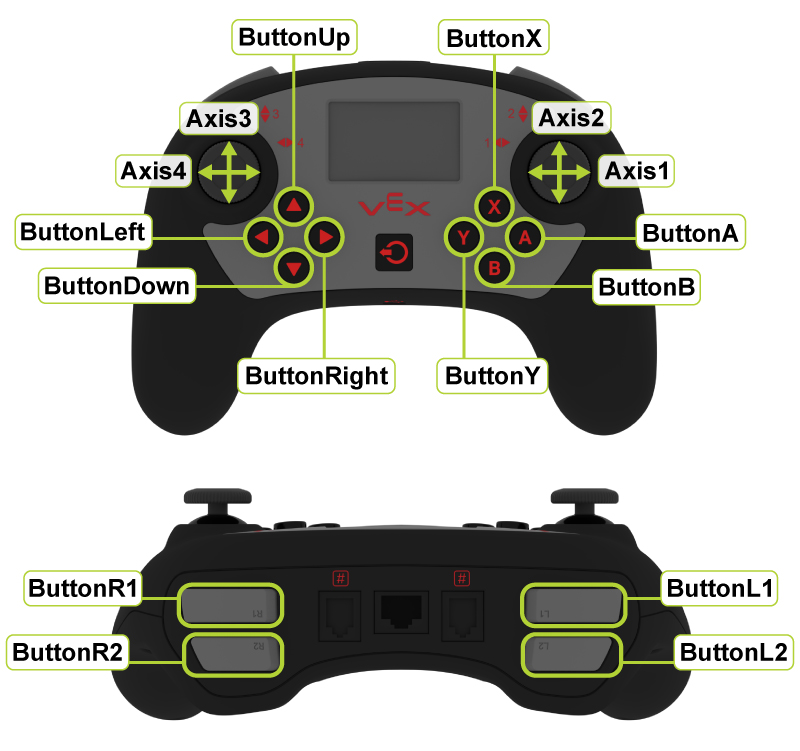
// Section 01
Controller Overview
What it does, who uses it, and what every team member needs to know.

VEX V5 Controller · Front & Back · All inputs labeled
Who should read this guide: Drivers (primary), programmers (for mapping and debugging), engineers (for care and troubleshooting), and any team lead who runs pre-match checks.
What the V5 Controller Does
Wireless: The V5 Brain has a built-in radio. Power on the Brain, power on the controller — they pair automatically when set to the same robot.
Left Joystick
Drive / Strafe
Typically controls robot movement — forward, backward, and turning in tank or arcade drive.
Right Joystick
Turning / Secondary Drive
Controls turning in arcade drive, or the right drive side in tank drive. Sometimes used for mechanisms.
L1 / L2 Shoulder
Left Shoulder Buttons
Two-level buttons ideal for intake control, lift direction, or any action needing two states (up/down).
R1 / R2 Shoulder
Right Shoulder Buttons
Mirror of L1/L2. Often used for scoring mechanisms, claw control, or auton selector navigation.
A / B / X / Y
Face Buttons
Four large buttons on the right side. Used for presets, toggles, emergency stops, or auton selector confirmation.
Up / Down / Left / Right
D-Pad
Four directional buttons. Good for auton selector navigation, mechanism presets, or partner controller coordination.
LCD Screen
Controller Display
Displays battery %, connection status, and can show custom text from your program. Check it before every match.
Battery & Charging
Built-in Rechargeable
Internal battery — charge via micro-USB. A dead controller during a match is a forfeit. Always charge the night before.
Smart Port (bottom)
Tether Connection
Used to tether directly to the Brain for wired control — helpful for auton testing without radio or for debugging.
How the Controller Connects to the Robot
Wireless: The V5 Brain has a built-in radio. Power on the Brain, power on the controller, and they pair automatically if set to the same robot. At competitions, the field control system manages pairing.
Tethered: Connect a Smart Cable from the controller's Smart Port to the Brain. Useful for testing in the pit, debugging, or when wireless signal is unreliable.
Before every match: Confirm the controller is paired to YOUR robot, not another team's. At competitions, multiple robots are powered on simultaneously. Check the controller LCD — it should show your robot name.
Common connection mistakes:
- Not waiting for the controller to fully pair before starting
- Powering on the controller before the Brain is ready
- Using the wrong robot profile at multi-robot events
- Forgetting to re-pair after Brain code re-upload
- Using a partially charged controller that disconnects mid-match
▶ Recommended — V5 Controller Setup & Pairing

Tap to play · Controller pairing, tethering, and LCD display walkthrough
1 of 5